GaeaGenerator
GaeaGenerator is the node that executes your graph and produces a GaeaResult that renderers can display in-game. A grid can have multiple layers, and each cell in the grid contains a GaeaMaterial that tells renderers what to draw.
It needs 3 resources to run:
GaeaGraph: contains graph nodes and their connections.GaeaGenerationSettings: contains generation options such as seed and world size.GaeaTaskPool: manages generation tasks and multithreading behavior.
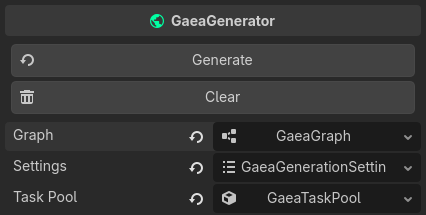
Typical Scene Setup
The most common setup is:
- Add one
GaeaGeneratorto your scene. - Assign a graph to
graph. - Assign generation settings to
settings. - Add one or more
GaeaRenderernodes that listen to this generator.
This setup is described in How Gaea Works.
GaeaGraph
The graph is usually saved as its own .tres resource, but it can also be embedded as a sub-resource in the generator. It is made of nodes and connections that define data flow. Each node has a specific role, and the output node determines what is generated.
Adding the GaeaGenerator to your scene tree and selecting it will open the graph in the Gaea panel at the bottom of the editor.
Graph layers
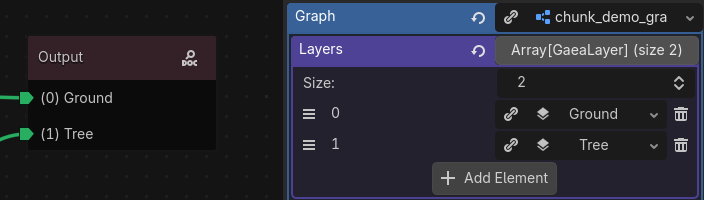
A graph can have multiple layers, which helps you split generation into clear responsibilities. This is especially practical for tile-based workflows: one layer for base terrain, one for props, one for enemies, and so on.
During generation, GaeaGenerator processes all enabled layers and combines them into a single GaeaResult that renderers can display.
Info
For better readability in the graph, give each layer a meaningful name with resource_name. Each layer appears as an output port on the output node.
Debug options
GaeaGraph has built-in debug options to inspect generation internals. Use them when tracking generation issues.
Available logging categories are:
Execute: Log execution data such as current area & current layer.Traverse: Log traverse data (which nodes are being traversed in the graph).Data: Log which data is being generated from which port.Arguments: Log which arguments are being grabbed.Threading: Log thread creation and process.
Preview Generation Settings
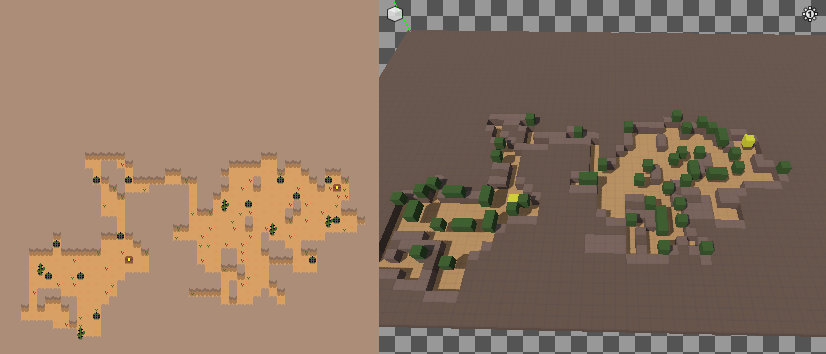
The generator can produce a preview of the generated world in the Gaea Panel. These settings are stored on the graph and used by the panel to render the preview. On the right side of the Gaea Panel, you can see a 3D viewport where each cell is displayed as a colored cube based on its material. This lets you inspect and debug a graph without connecting a renderer. Because Godot uses different coordinate conventions in 2D and 3D, you can choose from multiple preview coordinate formats.
The image below shows the same graph in 2D game rendering on the left and in the 3D preview on the right. The yellow chests and green vegetation appear in the same positions in both views.
You can configure the preview generation with the following graph properties:
preview_coordinate_format: How generated cells are displayed in preview (2D overlay/stacked or 3D perspective). A stacked format mean that each layer is displayed on top of the previous one, which can help debug layer composition issues. A overlay format will display all layers in the same 3D space.preview_seed: Seed used specifically for preview generation.preview_size_preset: Preset of chunk size used for generating preview. (SINGLE_2D,MULTIPLE_2D,SINGLE_3D,MULTIPLE_3D,MULTIPLE_3D_FULL_HEIGHT,CUSTOM).preview_world_size: Size of the generated world in the preview.preview_chunk_size: Size of the generated area in the preview.preview_chunk_count: How many chunks are generated in the preview.
Parameters
Graphs can expose runtime-editable values through GaeaNodeParameter nodes. Multiple parameter types are supported, including float, int, and bool, and they can be used by any graph node that supports parameters. A parameter node only stores a name, and that name becomes the parameter name shown in the graph inspector. You can rename it from the graph node with the pen icon on the right.
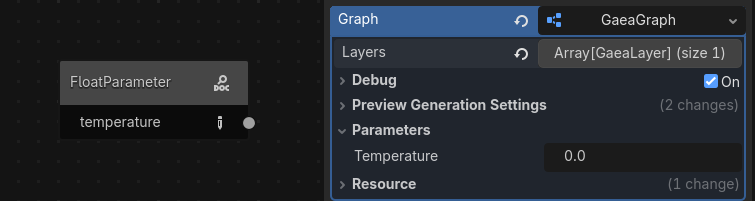
At runtime, you can read and write parameter values directly on the graph:
if generator.graph.has_parameter(&"temperature"):
    generator.graph.set_parameter(&"temperature", 0.85)
The GaeaGraph class has helper methods to work with parameters:
has_parameter(name: StringName) -> boolget_parameter(name: StringName) -> Variantset_parameter(name: StringName, value: Variant)get_parameter_list() -> Dictionary[StringName, Variant]
This is the preferred way to drive one graph from gameplay state without duplicating resources.
Warning
Editing parameter values during generation is not recommended and can produce unexpected results.
Learn more about the graph itself in Anatomy of a graph.
GaeaGenerationSettings
GaeaGenerationSettings controls how the graph is generated.
random_seed_on_generate: when enabled, eachgenerate()call picks a new random seed.seed: seed used for deterministic generation when random seed is disabled.world_size: size of the generated area. For 2D worlds, keepz = 1.
Note
For chunk-based or infinite generation, use a chunk loader node instead of relying only on a single static world_size. See GaeaChunkLoader for more details.
GaeaTaskPool
GaeaTaskPool handles execution scheduling and multithreading.
Options:
multithreaded: if enabled, tasks run throughWorkerThreadPool.task_limit: maximum number of tasks that can run at the same time (0means no queue limit).duplication_strategy: controls behavior when duplicate tasks are submitted.
Tip
You can use GaeaGenerationPriority.get_recommended_task_limit(chunk_count: int) to get a task_limit based on the number of chunks being generated and the number of CPU cores available.
Generation Flow
GaeaGenerator exposes multiple entry points:
generate(origin: Variant = null): Start the generaton process. First resets the current generation, then generates the whole world_size.generate_area(area: AABB, origin: Variant = null): generates only a specificAABBregion.cancel_generation(): Cancels the current generation tasks, if any.request_reset(): Emitsreset_requested. Does nothing by itself, but notifiesGaeaRenderersthat they should reset the current generation.request_area_erasure(area: AABB): Emitsarea_erasedsignal. Does nothing by itself, but notifiesGaeaRenderersthat they should erase the points of area.
In the generate functions you can optionally pass an origin argument to prioritize tasks. For example, the player position can be passed to prioritize nearby generation tasks. See GaeaGenerationPriority._origin for origin type.
When generation starts, the generator queues a GaeaGenerationTask, executes the graph, then emits generation_finished(grid) when results are ready.
Another way to generate chunks is to use a GaeaChunkLoader node, which calls generate_area() automatically based on player movement and chunk loading state. See GaeaChunkLoader for more details.
Signals
The generator emits several signals you can connect to game logic:
graph_changed(old_graph: GaeaGraph): Emitted when GaeaGraph is changed.about_to_generate: Emitted when the graph is about to generate.generation_started(): Emitted when aGaeaGenerationTaskis queued.generation_cancelled(): Emitted when aGaeaGenerationTaskis canceled.generation_finished(grid: GaeaResult): Emitted aGaeaGenerationTaskhas finished. The generated grid is passed as an argument.reset_requested: Emitted when this generator wants to trigger a reset.area_erased(area: AABB): Emitted when an area is erased.
Troubleshooting
- If nothing appears on screen, verify the output graph node is connected and a renderer is connected to this generator.
- If generation seems non-deterministic, disable
random_seed_on_generateand set a fixedseed. - If generation feels delayed under heavy load, tune
task_limitor reduce generated area size.