How Gaea Works
Gaea revolves around two core nodes: the generator and the renderer. The generator creates the data that describes your world, and the renderer turns that data into visuals in-game. This separation lets you use the generator on its own, or connect multiple renderers, for example a TileMapRenderer for gameplay and a custom renderer for a GUI preview.
The easiest way to learn Gaea is to download and explore the demo setups from the gaea-demos repository.
The basic setup is to have one generator, one renderer and a Godot node (here the TileMapLayer node) for the render.
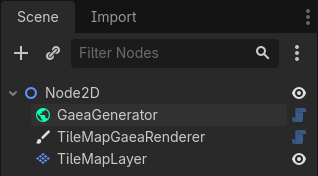
You can find a step-by-step tutorial to create this setup in the Generating Terrain guide.
Generator
The generator node need 3 resources to work: the GaeaGraph which contains the graph nodes and connections between them, the GaeaGenerationSettings which contains settings for the generator like the seed and the world size, and the GaeaTaskPool which contains the thread pool used to run the generator on a separate thread.
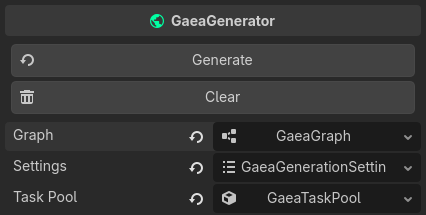
Learn more about the generator in GaeaGenerator.
Renderer
The GaeaRenderer takes what the generator creates, and draws it in the game. Gaea has 2 built-in renderers: the TileMapRenderer and the GridMapRenderer. They use TileMapMaterials and GridMapMaterials respectively, which tell them which tiles in the tileset or which elements in the gridmap to draw on screen.

Learn more about the renderer in GaeaRenderer.