GaeaRenderer
GaeaRenderer takes the GaeaResult produced by a GaeaGenerator and draws it into your scene.
This is an abstract base class. On its own, it does not render anything, but it defines the common behavior used by all renderer implementations.
Gaea provides two built-in renderers: TileMapGaeaRenderer and GridMapGaeaRenderer. They render to TileMapLayer and GridMap nodes respectively, using TileMapGaeaMaterial and GridMapGaeaMaterial values from the generated grid. See Built-in Renderers for details.

Typical Scene Setup
The most common setup is:
- Add a
GaeaGeneratorto your scene. - Add a
TileMapGaeaRenderernode. - Assign the generator to the renderer's
generatorproperty. - Assign the target render nodes used by that renderer, a
TileMapLayerin this case.
This setup is described in How Gaea Works.
Generator Connection
When a renderer is assigned a generator, it automatically connects to these generator signals:
generation_finished: callsrender(grid).area_erased: callserase_area(area).reset_requested: callsreset().
This means a renderer usually does not need manual signal wiring. Once the generator property is set, it will react to new generation results automatically.
Layer Mapping
Both built-in renderers work by matching generated layers to scene nodes by index.
For example:
- generated layer
0(here Ground) renders totile_map_layers[0] - generated layer
1(here Tree) renders totile_map_layers[1]
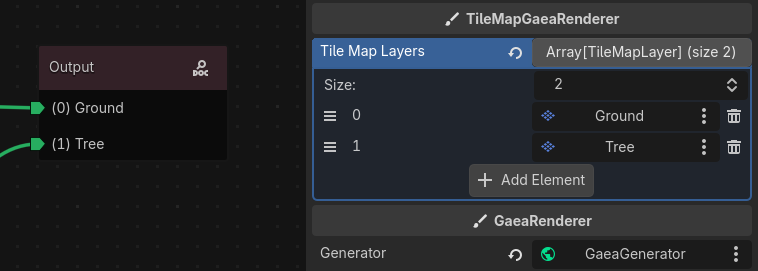
Info
Keep the renderer arrays aligned with the graph layer order to avoid rendering data to the wrong target node.
Built-in Renderers
Gaea currently provides two built-in renderers.
TileMapGaeaRenderer
TileMapGaeaRenderer renders TileMapGaeaMaterial values onto TileMapLayer nodes.
It uses the tile_map_layers array, where each entry corresponds to one generated layer. If the generated grid has multiple layers, the renderer will try to render each one to the matching TileMapLayer .
It supports several tile placement modes through the material:
- single-cell placement
- terrain connection placement
- pattern placement
It also converts Gaea grid coordinates to the correct TileMapLayer coordinates based on the TileSet layout and shape. See pull request #339 for details on how this works.
The tilemap renderer has its own coordinate system, which means that the generated grid coordinates are converted to the correct tilemap coordinates based on the TileSet layout and shape. This allows you to use any TileSet configuration without worrying about coordinate mismatches. The render class provides two static methods to help with this conversion, check the built-in documentation for details.
GridMapGaeaRenderer
GridMapGaeaRenderer renders GridMapGaeaMaterial values onto GridMap nodes.
It uses the grid_maps array, where each entry corresponds to one generated layer. Each matching cell is written with the material's mesh item index and orientation.
Signals
The renderer emits the following signals:
render_finished: emitted when rendering is complete.render_reset: emitted whenreset()is called.area_erased(area: AABB): emitted when a rendered area is erased.
Custom Renderers
To create your own renderer, extend GaeaRenderer class and implement the three abstract methods:
@tool
class_name MyRenderer
extends GaeaRenderer

func _render(grid: GaeaResult) -> void:
    pass

func _erase_area(area: AABB) -> void:
    pass

func _reset() -> void:
    pass
This is the right approach when you want to render to a custom scene structure, a preview widget, or a game-specific visual system.
Troubleshooting
- If nothing is rendered, verify that the renderer has a valid
generatorassigned. - If only some layers appear, check that the renderer array size matches the graph layer count.
- If rendering goes to the wrong positions in a
TileMapLayer, verify theTileSetlayout and shape configuration. - If old 3D cells remain visible in a
GridMap, make sure rendering and reset flow matches your expected behavior.